Proxara watches your firm’s Outlook, SharePoint and Karbon, keeps one true picture of every client, and does the next step when something arrives. A person approves before anything leaves the firm, and client names never do.

Waiting on documents
Returns due 15 October · 3 of 9
- DHDaniel R Harlow2025 Tax Return 1040 · Form 8879 not signed1 missing
- TVTeodora Vance2025 Tax Return 1040 · Organizer not back1 missing
- MBMarcus and Elin Brandt2025 Tax Return 1040 · Corrected 1099-B2 missing




Reads what your firm already runs, with each person’s own access.



Works inside the assistant your staff already use.
What arrives, and what gets done.
Documents come in all week: a bank statement from a client, a notice from the IRS, a signed Form 8879, a corrected K-1. Proxara notices each one, does the step your firm would do next, and leaves the result where your firm already looks.
What leadership sees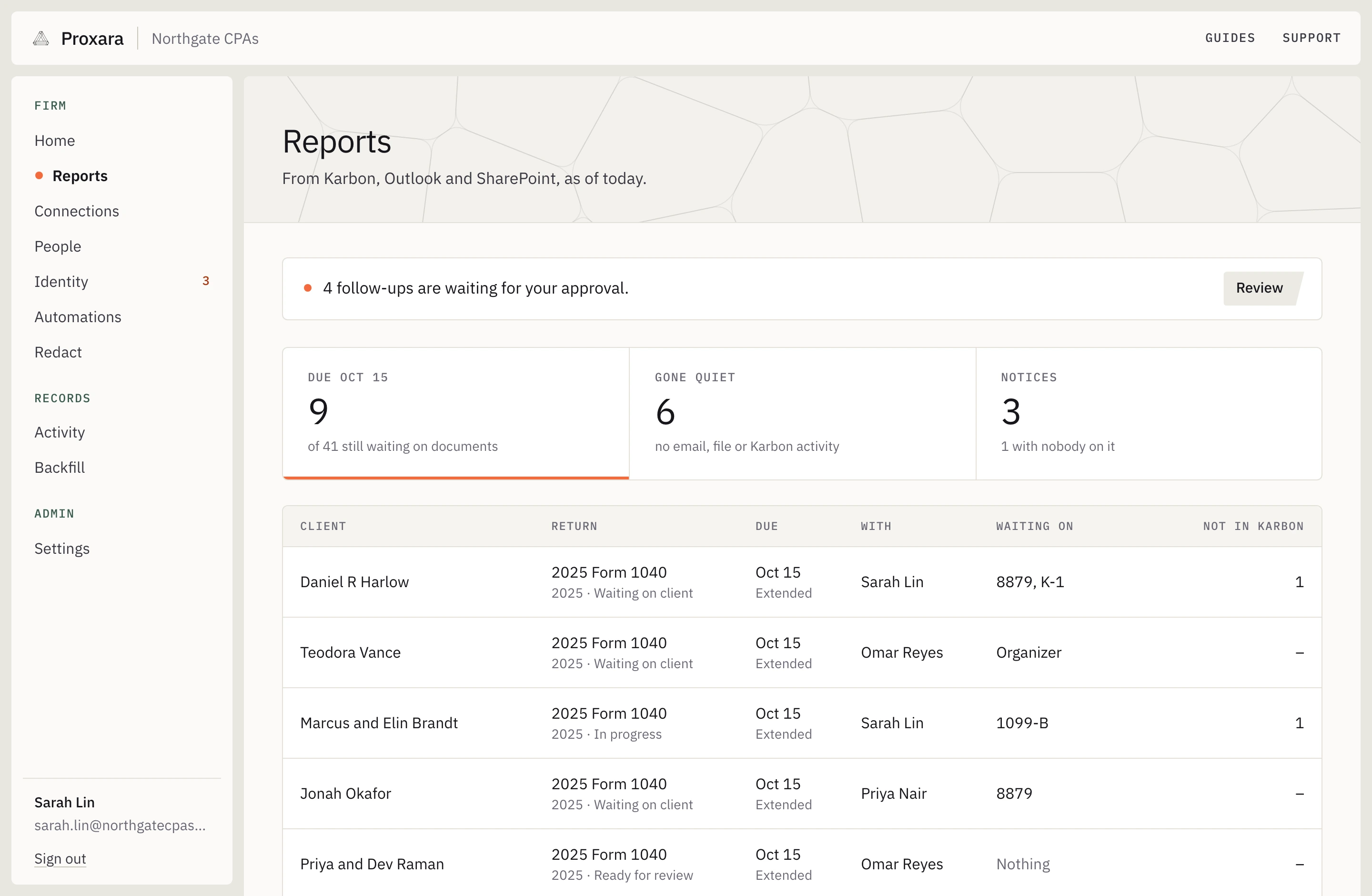
A bank statement comes in
The month’s journal entries, coded the way last month’s were, saved as the CSV in the client’s SharePoint folder. The Karbon task is ticked, and the client is asked about anything that could not be placed.
An IRS or state notice comes in
A Karbon job the same day, on the person who already has the client, with the notice type, the amount and the response date.
A return is still waiting on something
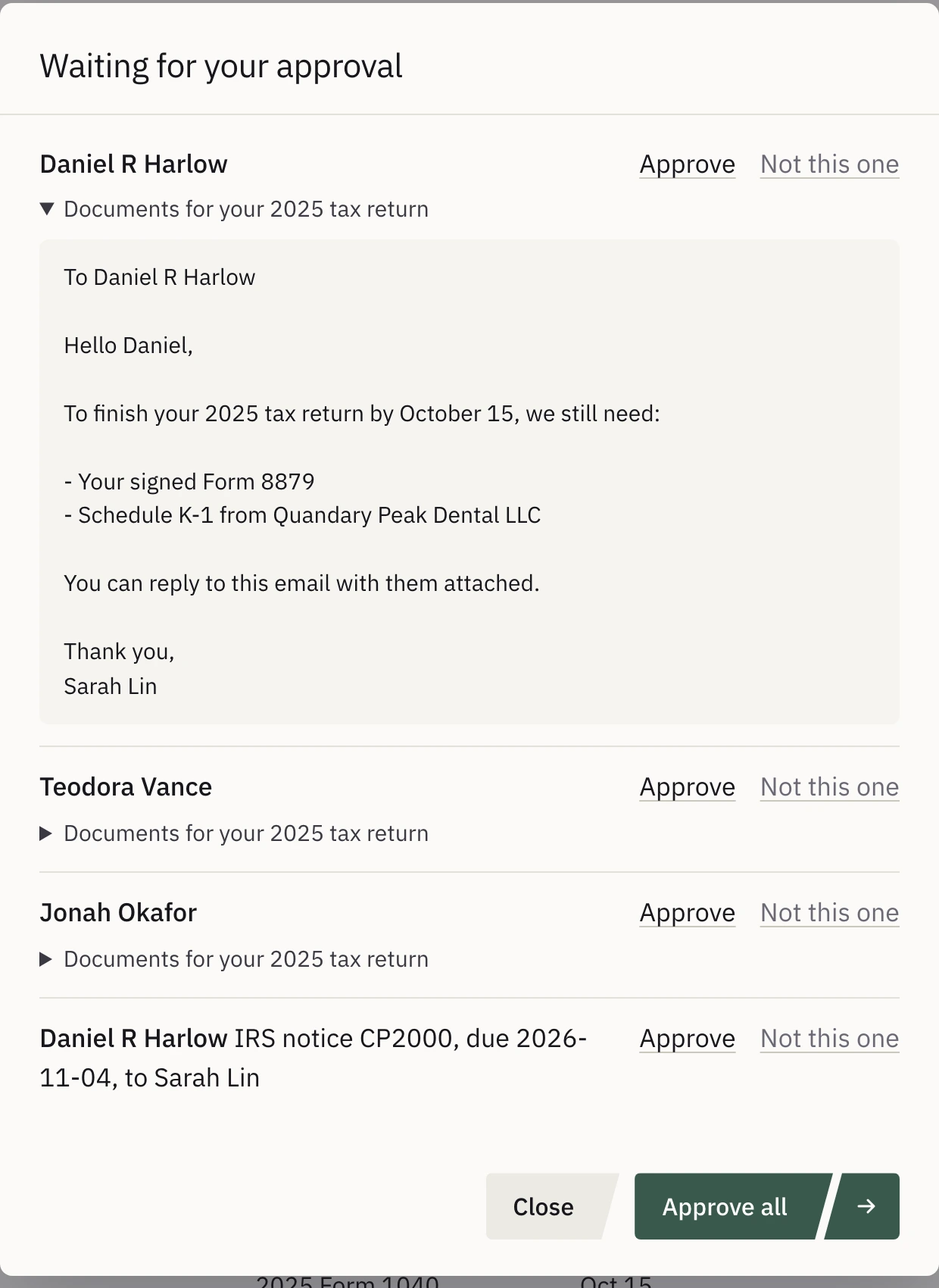
Before the deadline, a reminder to the client listing exactly what is missing, ready to send from the preparer’s own mailbox once they approve it.
The console as it is, with an example firm’s figures.
One picture of every client.
Ask about any client in the assistant your staff already use, and the answer comes from the firm’s own email, files, Karbon and CCH, with the source of every fact one click away. Nobody has to log anything for it to be right.
How staff use it
What are we still waiting on for this client?
Daniel R Harlow
With Rosalind Finch, member · Imogen Harlow, member · 1 more
2025 Tax Return 1040 · Waiting2 missing
2Documents missing
0Open flags
Two documents are outstanding: the organizer and the signed Form 8879. Everything else on last year’s list has arrived.
Nothing leaves without a person.
The email to the client, the Karbon note, the CSV in the folder: each one waits in the Proxara window with the real names until someone clicks Approve. It then runs as that person, leaves a receipt, and can be reversed.
A firm can start with Proxara reading only, and allow approved changes when it is ready.

 Draft an email to Daniel R HarlowHide
ToDaniel R Harlowdharlow@quandarypeakdental.exampleoutside the firm
Signed Form 8879 needed to file your 2025 return
Hi Daniel,
Your 2025 return is prepared apart from one item: the signed Form 8879 (IRS e-file authorization). We can’t submit the return until we have it.
Show the whole message
Edit
 Note on 2025 Form 1040 - HarlowHide
2025 return: waiting on signed Form 8879
2025 Form 1040 is waiting on one document: the signed Form 8879. All other expected documents (organizer, 1098, 1099-R, both K-1s, W-2) are received. Email requesting the signed 8879 drafted to the client for approval.
Edit
ApproveReject
Both are ready for your approval in the window, and nothing runs until you approve.
Client names stay with your firm.
The assistant only ever receives codes such as P-7KQ2M in place of names, SSNs, EINs, account numbers and addresses. The swap happens in your firm’s own environment in Azure, and the real names come back only to the Proxara window on your staff’s screens.
How it works What the assistant receives
P-7KQ2M’s 2025 K-1 from B-4F2KD shows $212,400 in box 1. A corrected K-1 arrived on 30 September.
What your staff see
Daniel R Harlow’s 2025 K-1 from Quandary Peak Dental LLC shows $212,400 in box 1. A corrected K-1 arrived on 30 September.
A file on your desk, with a right-click.
For the odd file that is not in SharePoint, right-click it in Windows and choose Redact. A copy appears beside the original with the names and numbers replaced and every figure kept. Right-click what comes back, and the names return.
Proxara on WindowsBuilt for your firm’s security review.
Documents are read by a model Proxara runs itself, inside your firm’s environment, never by an outside AI provider. Every view of a real name and every change is recorded, and your administrators can export the log.
Security at Proxara
- Where it runs
- In your firm’s own application and database in Microsoft Azure in the United States, with its own encryption keys. Nothing is shared with another firm.
- What the assistant receives
- Codes in place of names, SSNs, EINs, account numbers and addresses. Amounts, dates and form lines stay, so the work still gets done.
- Who can see what
- A person sees a client only if they can already open something behind it in Microsoft 365, Karbon or CCH.
- What is kept
- An encrypted record of each client and a working cache that expires 30 days after last use. Your documents stay where they are.
- Leaving
- Disconnecting deletes your firm’s keys and environment, which leaves every backup unreadable.
Set up in an afternoon.
Three people at the firm each do one short task. The first picture of your clients fills in while Proxara reads in your firm’s history.
How setup works
 Microsoft 365Outlook, SharePoint, Excel and Teams · 26 of 26 people signed inConnected
- KarbonClients, work, notes and filesConnected
Your Microsoft administrator
Approves access to the mailboxes and SharePoint sites the firm picks, with a few commands the console has already written out.
Your Karbon administrator
Pastes in a Karbon key.
Whoever runs your assistant
Adds Proxara to Claude, ChatGPT, Gemini or Microsoft 365 Copilot, once for everyone.

See it on your own firm’s work.
We set it up with your firm, reading only at first, and walk your partners through what it finds on your own clients.
- Your IT lead gets the Security Overview and the sub-processor list before anything is connected
- Nothing in your systems changes while you decide